TimeControl Integration abilities
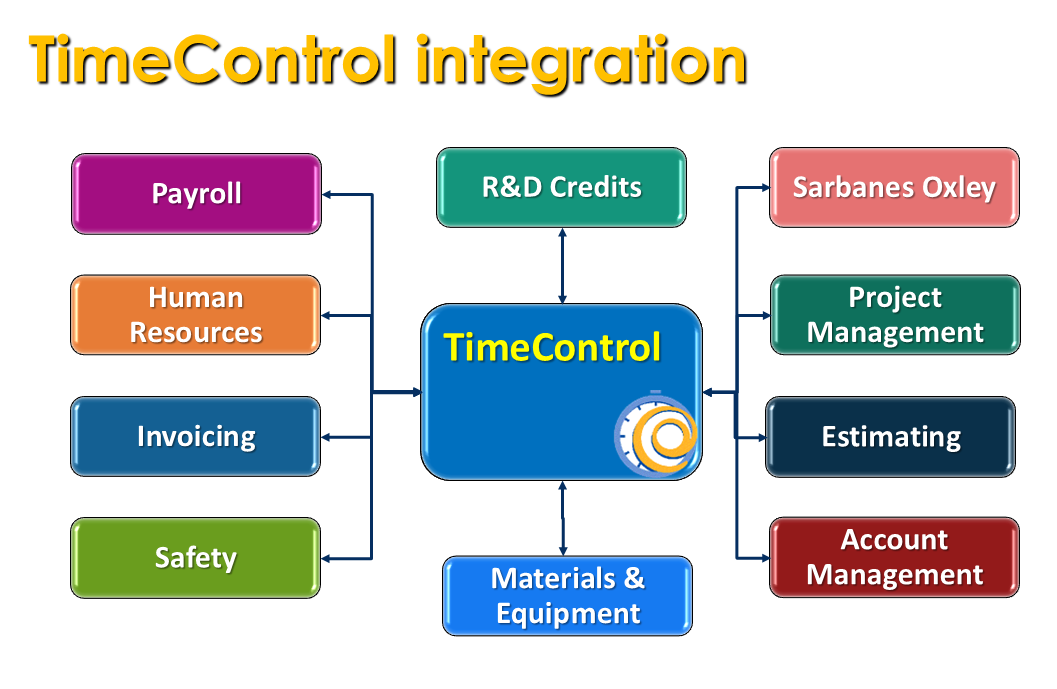
Since its inception in 1994 and based on design work for ten years leading up to its first release, TimeControl has been an enterprise system and, like all enterprise systems, it rarely exists alone. Since its very first version, one of TimeControl’s most important features is its ability to integrate with other tools. In the earliest days of the product this meant being able to import and export on demand but the extent of TimeControl’s integration functionality has extended much further over the years.
TimeControl’s hallmark is to be a multi-purpose timesheet with use from updating project management to updating Finance and Payroll systems. This means being highly flexible but also requires that data must be able to move in and out of TimeControl in order to become the center of a much larger system.
Imports and Exports
One of the easiest and most popular ways to move data between TimeControl and other corporate systems is to use the TimeControl import and export links. This functionality has been enhanced numerous times over the years and it works just as well in TimeControl Online as is does in TimeControl on premise. TimeControl can consume a file for import (such as updated employees from new hires) on demand at any time. The file can be in Excel or CSV format and you can use a pre-existing template to move the data in from your PC or wherever you access it at any time.
TimeControl Imports and Exports can be automated to happen behind the scenes on a pre-defined schedule. You can use encrypted secure FTP transfer protocols to locate a file for import or to transmit a file as an export and then automatically send an email announcing if the file was transferred successfully or if intervention is needed. This can be a great way to update TimeControl from HR records. The HR system can create an onboarding file for TimeControl in a specific location and TimeControl can check for it and consume it overnight. There will be a log of the file import so the Administrator can make sure it was imported successfully. We tend to talk about Import/Export as an interface rather than an integration but that’s semantics. The data is being integrated between different systems in a controlled and monitored fashion.
Batch Tracking
One aspect of TimeControl Exports that is critical when thinking of financial systems is the ability to determine if a record has ever been exported before. This is handled in TimeControl by activating “Batch Tracking” in the export definition of timesheet records. When enable, Batch Tracking creates a batch number for each export and attaches that number to each posted timesheet record that was exported as part of that batch. This is true whether the export was created on demand or automatically on a schedule.
Let’s imagine that an export is used for Payroll for hours over the last 2 weeks. The export is defined as all posted hours for the last 14 days. After creating the export and sending it to the Payroll systems, additional hours or corrections of hours are added to that period of time. Re-creating the original export will have a correct list of the hours, but when they are imported, the Payroll system will receive duplicate records for the period during those 14 days. Batch Tracking overcomes this by only sending data that was not exported already. If there is some requirement to see the data previously exported, an export of the previous batch can always be made. This is a powerful feature.
On Demand or Automatically on a Schedule
TimeControl’s imports and exports are designed to work either on demand whenever an authorized user engages them or on a schedule. For most integrations, scheduled imports and exports are common. For imports, the definition can locate a new import file for consumption when it is put into a directory by an external system where the TimeControl SFTP locator can find it. TimeControl will rename and move the file once it is consumed so it won’t be consumed multiple times. For exports, the definition can send the data to an SFTP location defined and authorized by the administrator. Then the export file is automatically dropped there for consumption by the external system.
These import / export definitions can be run nightly or daily or hourly or monthly at whatever frequency is required. The only thing we ask for clients to check for is to not try to make the interval so rapid that TimeControl won’t have been able to complete the last import before trying to start again. Logs for all on-demand or scheduled imports are always available for administrators to review and the TimeControl import / export system is designed to optionally send an email notification for when the import runs, if it is successful or if it fails so maintain the system is quite straightforward.
Line Item Approval of Exports
TimeControl's extensive approval functionality is linked to exports. Using Line Item Approval, administrators can ensure that any line exported from TimeControl to external systems has already been approved to be exported. Separate approval mechanisms can exist for each export definition.
Links to Project Management
Since its first release, TimeControl has included links to Project Management Systems. Importing and exporting data with project systems is more complicated that just importing or exporting data to and from TimeControl Tables. Project Management links must take into account how Activities are identified, how resource and assignment definitions will connect to individuals and how progress and actuals are consumed by the Project system.
Project Management Links are almost all bi-directional based on the capabilities of the pm system in question. These include links to Microsoft Project, Project Online, Project Server, Microsoft Planner, InEight, Hard Dollar, Birdview BrightWork, Open Plan, Oracle Primavera and Primavera EPPM. A complete list of currently included integrations is available in the TimeControl Solutions area.
TimeControl can receive project, task, activity, resource, assignment, progress and user-defined field information from the project system. Then, depending on the system in question, it can send back hours, costs, estimate to complete, expense cost, material consumed, equipment used, and activity-steps. These links can also be run on demand or on a schedule. What is most typical is to update TimeControl with the latest data from the Project system then have individual project managers run updates of actuals and progress into the project system following line item approvals at a time they are ready to receive the updates. The definition for each project record is unique so, for example, a project with unique user-defined fields can be accommodated separately from others in the same system. The Project Import and Project Export definitions are also dependent on the system type as not all project management systems support the same type of updates.
Authentication for these tools is managed within TimeControl depending on the requirements of the system.
Links via API
The ultimate in integration is using TimeControl’s bi-directional full service RESTful API (Application Programming Interface). This interface allows the client to create code to access TimeControl directly to push data or to pull data out for almost every aspect of the system. The API makes sure that requests through it won’t violate TimeControl’s referential integrity or any of the other database-based or configuration based rules. The API’s power is extensive.
This is one method clients can use to pull TimeControl data and then data updates for external data systems like Microsoft Power BI or other reporting or analysis tools.
A full list of the API’s endpoints is available within TimeControl in the documentation menu area. The API documentation is dynamic. It is created by the API itself so it is always up to date. The API documentation also includes guidance on authentication and starter code to get an integration project underway. Integration is something considered in every TimeControl deployment
Other methods
This is not at all an exhaustive list. First of all, for those using TimeControl on-premise, there is direct access to the database. While that represents the minority of TimeControl users, it is still a viable option for those who work on-premise. Also, all of TimeControl reporting formats such as the Drill-Down Analyzer or the Report Interface have the abilility to export their results. In the case of the Report Interface which ships with numerous templates, reports can be created to be delivered automatically on a schedule in one of numerous formats. This is one way to send email exports out of TimeControl for further analsis and formatting.
Integration is a key element of virtually every TimeControl deployment
Whether you start with a simple link to a project management tool or a simple export for finance, thinking of how TimeControl can be at the center of your larger corporate system is something we always encourage.
Related Content
-

Creating your Approvals Process in TimeControl
Over and over we've seen the biggest challenge in deploying a timesheet system to be in the implementation of the approvals process. Creating a flexible and powerful approvals process would be a significant accomplishment with any timesheet system and when you are trying to overcome the approvals requirements of multiple aspects of the organization at the same time, it can be insurmountable. This is why we have created so much functionality in TimeControl to create your own approvals process. This white paper outlines the building blocks you can use to create approvals for the Project Management, Billing, HR, Payroll and Job Costing departments all within the same system and used at the same time.
Read White Paper